


My terminal is my main workspace, it is where I live for most of the day, writing code, running agents, and managing servers. A multiplexer is the glue that holds it all together, it keeps my context alive even if my connection drops.
I’ve used Tmux for years, it’s stable, stays out of my way, and fits the Unix philosophy of being a simple tool that’s easy to script. It turns my terminal into a series of project workspaces that I can jump between.
When I look at a multiplexer, I have a few things I need:
- Remote-First Workflow: My laptop is basically a thin client, most of my work happens on remote workstations via SSH, so the multiplexer has to run there and survive network drops.
- Unified Shortcuts: I need my environment to be the same at work and at home, I don’t want to spend energy on different keybindings for different machines.
- Named Sessions: I need to organize work into named projects that I can detach from and return to later, exactly where I left off.
- Fast Pane Management: Splitting the terminal horizontally or vertically should be second nature.
- Neovim Integration: Navigating between Neovim and terminal panes needs to be seamless, using the same directional keys (
Ctrl + h/j/k/l). - Fuzzy Session Switching: I need a fast way to jump between projects using a launcher that combines active sessions and bookmarked directories.
Tmux handles all of this easily, mostly because its CLI is so flexible. I can extend its behavior with simple shell scripts and fzf.
My Current Workflow
I’ve written about my setup in more detail in my Productivity post, where I go into how I use Tmux, Neovim, and Zsh to stay organized. But when Zellij started getting more attention, I was curious to see if a “modern” take on the multiplexer could actually improve things.
Learning Zellij
Zellij is very approachable, you can start it with a single command and the built-in UI guides you through the basics. I particularly liked the command mode toolbar because it shows you the available shortcuts for whichever mode you’re in, which is great for building muscle memory. It feels a lot like the which-key.nvim plugin for Neovim.
It also uses a modal system (Normal, Insert, Pane, etc.) that feels very familiar to anyone used to Vim.
The configuration uses KDL . It’s a fine language, but it’s yet another syntax to learn. Zellij originally supported YAML but switched to KDL to avoid some of YAML’s downsides.
Setting up key bindings and workspaces
I wanted to mirror my Tmux muscle memory as closely as possible. In my config.kdl , I set up these mappings:
Ctrl + Spaceas my prefix (the “Tmux mode”).\for vertical splits and-for horizontal ones.Ctrl + h/j/k/lfor directional navigation.
The first real problem was that Zellij’s modes often conflict with Neovim’s. To keep navigation fluid, I had to bring in a couple of plugins.
I used zellij-autolock to detect when I’m in a Neovim pane and automatically switch Zellij to “Locked” mode so it doesn’t intercept my Vim keys. On the Vim side, zellij.vim handles the communication back to Zellij.
It works, but it feels like a bit of a hack. It relies on timers and workarounds , which means if I move between panes too fast, the synchronization occasionally trips up.
The Session Launcher
I need to be able to hit a key, find a project, and jump into its workspace (creating it if it doesn’t exist) in one motion.
Zellij has a built-in session manager with a nice UI, but it felt too prescriptive to me. It wants you to manage sessions its way, and it doesn’t play as nicely with external tools like fzf. This is where I started missing Tmux’s minimalism.
In Tmux, I use a
python script
to aggregate project bookmarks and active sessions, then pipe them into fzf:
# Simplified version of my setup
( cat $bookmarks && tmux ls ) | fzf --tmux | xargs tmux switch-client -t
Zellij doesn’t have a direct equivalent to tmux switch-client in its CLI. I was surprised that I had to install a third-party plugin (
zellij-switch
) just to get this basic functionality. According to this
Reddit thread
, plugins are currently the intended way to handle this.
I ended up writing a shell script called
zellij-switch-session
and mapping it to Ctrl + Space + Ctrl + J.
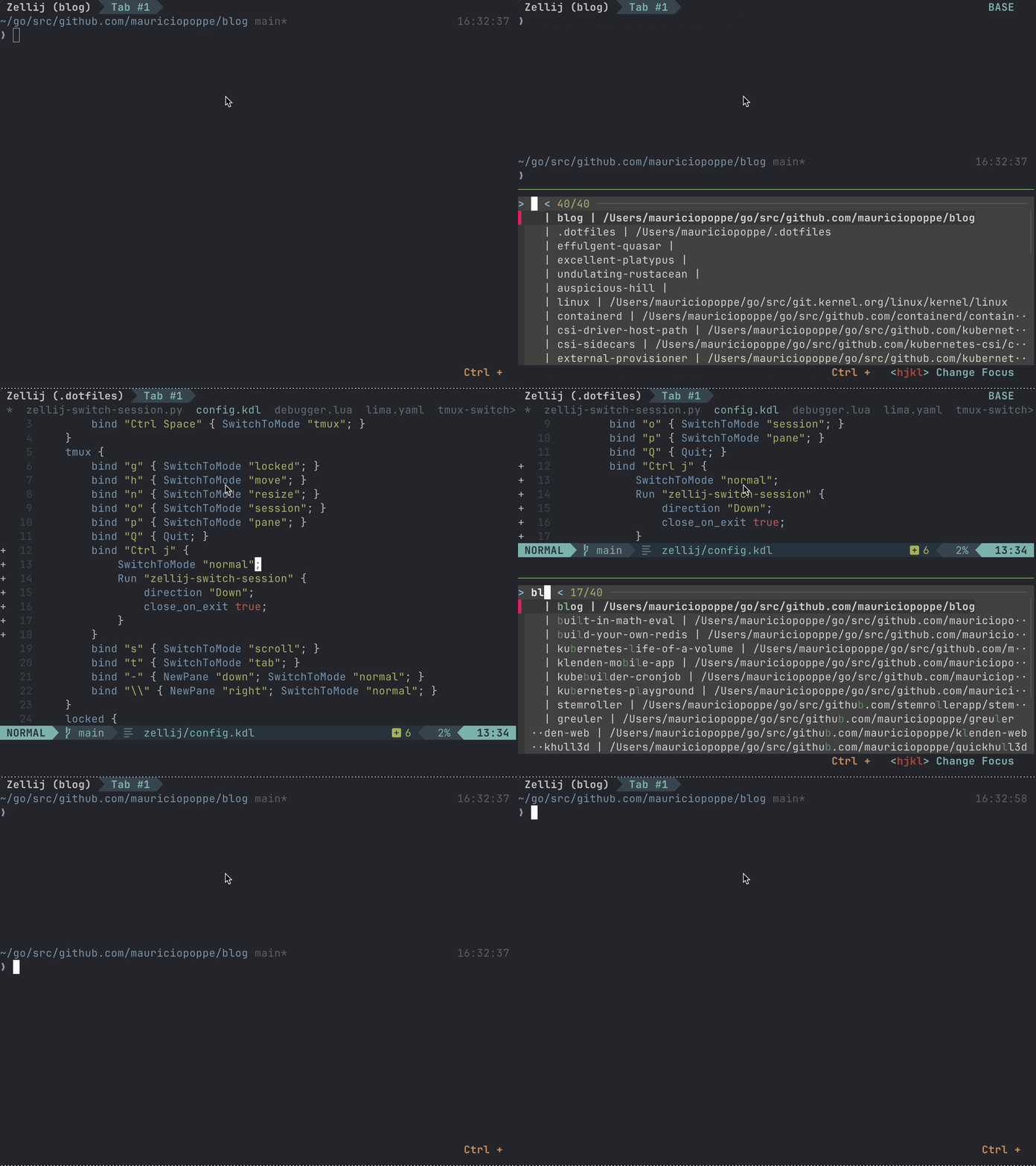
Demo of switching sessions with Zellij
Feature & Workflow Comparison
| Capability | Tmux Setup | Zellij |
|---|---|---|
| Session Switching |
Instant fuzzy jump with switch-client + fzf
|
Built-in session UI or third-party CLI plugin |
| Last-Session Toggle |
Native switch-client -l (instant back-and-forth)
|
Manual name selection in session manager |
| Neovim Navigation |
Native vim-tmux-navigator (seamless socket check)
|
Requires zellij-autolock / smart-splits.nvim
|
| Scriptability |
Fully headless via tmux send-keys & IPC
|
Action CLI & WebAssembly plugin architecture |
| Config Syntax |
Flat tmux.conf (UNIX style)
|
Structured KDL format |
| Pane Recovery |
respawn-pane -k to unwedge hung processes
|
Re-attach or kill pane from action menu |
| Discoverability | Cheatsheets and manual status bar configs |
Built-in command mode toolbar (which-key style)
|
The Verdict
After using Zellij for three weeks, I went back to Tmux. There are several things I liked about Zellij:
- Editor Integration: Opening the current pane’s scrollback output directly in Neovim for searching is fast and natural.
- Discovery: The command toolbar provides an intuitive way to learn shortcuts without constantly referencing a cheatsheet.
- Layout Isolation: Resizing a pane from within (such as opening a debugger UI in Vim) does not distort the rest of the window’s layout.
- Persistent Zoom: If you zoom into a pane, it stays zoomed even when switching across tabs or panes.
However, I encountered friction with several core power-user requirements:
- No “Last Session” Shortcut: Tmux provides a native way to toggle between current and previous sessions (
switch-client -l). In Zellij, jumping between two active workspaces requires typing out the session name or opening the picker every time. - Mouse Resizing: Adjusting split dimensions with click-and-drag mouse events required extra keybinding modes.
- Unresponsive Panes: If a build process or SSH tunnel hangs, Tmux lets you immediately run
respawn-pane -kto restart it without destroying pane geometry. - Layout Synchronization: Temporary floating panes occasionally caused background pane layouts to shift unexpectedly across session restores.
Zellij is an impressive project with active development. For engineers looking for a modern, batteries-included terminal multiplexer with zero initial configuration, Zellij offers a welcoming experience. But for terminal workflows built around headless shell orchestration, fzf pipeline integration, and fast SSH session switching, Tmux’s lightweight scriptability remains the gold standard.
For a deeper look into the surrounding terminal setup (including Neovim configuration, Zsh aliases, and dotfiles management), see my Productivity & Terminal Workflow note.